
 加载中…
加载中…matlab里面如何保留小数特定位数 .转
 (2012-06-05 14:37:29)
标签:
杂谈 |
分类: matlab |
转载请注明出处:http://blog.csdn.net/yf210yf
a=1.23456789
b=vpa(a,7)
b = 1.234568
vpa(a,12)
ans = 1.23456789000
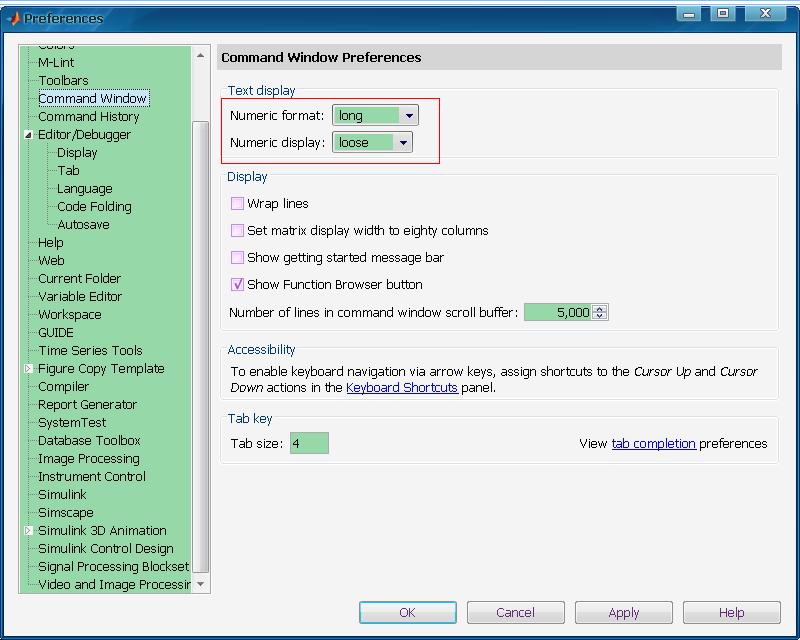
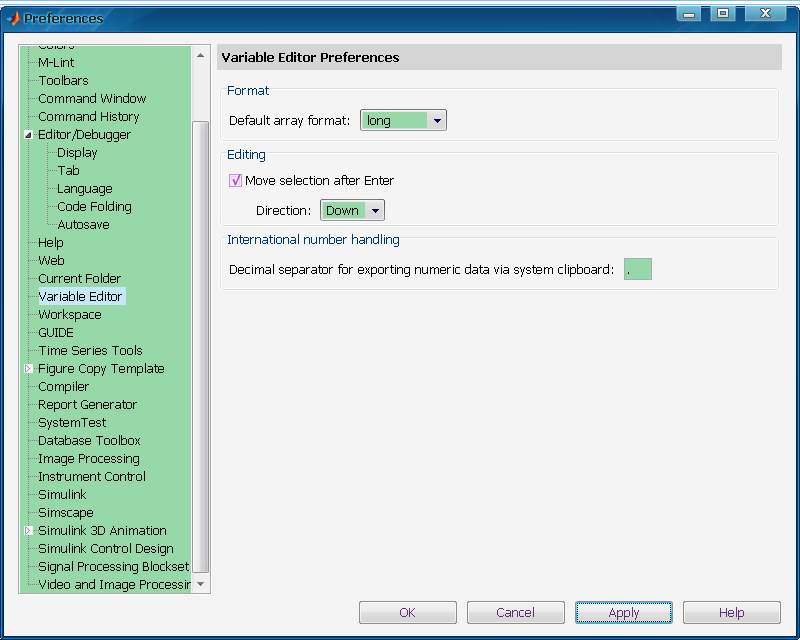
format:设置输出格式 对浮点性变量,缺省为format short. format并不影响matlab如何计算和存储变量的值。对浮点型变量的计算,即单精度或双精度,按合适的浮点精度进行,而不论变量是如何显示的。对整型变量采用整型数据。整型变量总是根据不同的类(class)以合适的数据位显示,例如,3位数字显示显示int8范围 -128:127。format short, long不影响整型变量的显示。 format long 显示15位双精度,7为单精度(scaled fixed point) format short 显示5位(scaled fixed point format with 5 digits) format short eng至少5位加3位指数 format long eng 16位加至少3位指数 format hex 十六进制 format bank 2个十进制位 format + 正、负或零 format rat 有理数近似 format short 缺省显示 format long g 对双精度,显示15位定点或浮点格式,对单精度,显示7位定点或浮点格式。 format short g 5位定点或浮点格式 format short e 5位浮点格式 format long e 双精度为15位浮点格式,单精度为7为浮点格式 Matlab里面显示的数字默认情况下是以short类型进行显示和存储的。但是有时候我们需要对它的显示格式(精度)进行更改,以适合我们的需求。更改方法如下:
http://hi.csdn.net/attachment/201202/22/0_1329900216nc9P.gif.转" />
http://hi.csdn.net/attachment/201202/22/0_1329900214R6F9.gif.转" />
Matlab取整函数有:fix, floor, ceil, round.取整函数在编程时有很大用处。
一、取整函数
1.向零取整(截尾取整)
fix-向零取整(Roundtowards zero);
>> fix(3.6)
ans = 3
2.向负无穷取整(不超过x的最大整数-高斯取整)
floor-向负无穷取整(Roundtowards minus infinity);
>>floor(-3.6)
ans= -4
3.向正无穷取整(大于x的最小整数)
ceil-向正无穷取整(Roundtowards plus infinity);
>>ceil(-3.6)
ans= -3
4.向最近整数取整,四舍五入(四舍五入取整)
round-向最近整数取整,四舍五入(Roundtowards nearest integer);
>>round(3.5)
ans= 4
二、在小数点后某一位四舍五入,即保留几位小数,也经常用到。
1.数值型 roundn—任意位位置四舍五入
>>a=123.4567890;
>>a=roundn(a,-4)
a= 123.4568
其中roundn函数功能如下:
y= ROUNDN(x) rounds the input data x to the nearest hundredth. %不指定n,精确到百分位 y = ROUNDN(x,n) rounds the input data x at the specified power %精确到小数点后指定位数n
2.符号型
digits(4)
vpa(....)
必须说明:vpa命令不能识别整数与小数,只算总位数,因此对它来说小数整数无论哪个都占一位,例如对9.3154保留两位小数时就得写成:
>>a=9.3154;
>>digits(3)
>>b=vpa(a)
b=32 9.
其中b为符号型变量;
3.字符型
>>a=12.34567;
>>b= sprintf('%8.2f',a)
b= 12.35 其中b为字符型变量。
matlab文本输出
两个函数:disp
fprintf
1、函数disp只带一个变量,他可以是自负矩阵或数值矩阵,要输出简单的文字信息,只需要用单引号将信息括起来:
>>disp(‘my favorite color is red’);
或者
>>yourname=input(‘enter your name’,’s’);
>>disp([‘your name is’,youname]);
例如
>> yourname = input('enter your name ','s');
enter your name panrq
>> disp(['your name is ',yourname]);
your name is panrq
选择带数值变量值的文本信息时,需要用函数num2str将数值变量的类型转换字符型
>> x=98;
>> outstring = ['x = ',num2str(x)];
>> disp(outstring);
x = 98
>>disp(['x = ',num2str(x)]);
x = 98
disp函数只能带一个变量,表格中的各列需奥组合成一个矩阵,如下面的程序所示。
>> x=0:pi/5:pi;y=sin(x);
>> disp([x' y']);
0 0
0.6283 0.5878
1.2566 0.9511
1.8850 0.9511
2.5133 0.5878
3.1416 0.0000
Format命令
控制显示模式,直到下一个format出现前,这条format命令一直有效。
>> x=1.23456789;
>> format short;disp(pi);
3.1416
>> format long;disp(pi);
3.141592653589793
>> format short e;disp(pi);
3.1416e+000
>> format +;disp(pi);
+
>> format bank;disp(pi);
3.14
2、函数fprintf
fprintf(format);
fprintf(format,variables);
fprintf(fid,format,variables);
例如:
>> fprintf('i am concreten');
i am concrete
>> a=3;b='s';
>> fprintf('this is a %d and %s n',a,b);
this is a 3 and s
喜欢
0
赠金笔