
 加载中…
加载中…Qt中设置widget背景颜色/图片的注意事项(使用样式表 setStyleSheet())
 (2014-04-16 09:35:27)
标签:
qt样式表it |
分类: QT |
在Qt中设置widget背景颜色或者图片方法很多种:重写paintEvent() , 调色板QPalette , 样式表setStyleSheet等等。
1:setStyleSheet()
MainWin::MainWin()
{
this->setStyleSheet("background-image:url(:/bmp/IMG_0345.JPG)");
iButton = new QPushButton(this);
iLabel = new QLabel(iButton);
}
http://hi.csdn.net/attachment/201008/17/0_1282035903Fakx.gifsetStyleSheet())" />
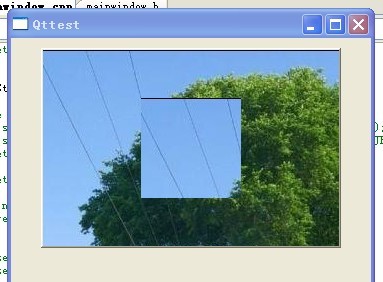
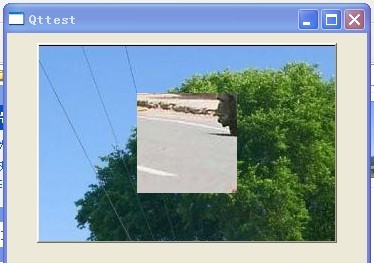
修改一下上例代码:
MainWin::MainWin()
{
this->setStyleSheet("background-image:url(:/bmp/IMG_0345.JPG)");
iButton = new QPushButton(this);
iLabel = new QLabel(iButton);
iLabel->setStyleSheet("background-image:url(:/bmp/1257253475842.jpg)");
}
http://hi.csdn.net/attachment/201008/17/0_1282035959j5OA.gifsetStyleSheet())" />
MainWin::MainWin()
{
iButton = new QPushButton(this);
iButton
iLabel = new QLabel(iButton);
}
运行一下,效果如下:
http://hi.csdn.net/attachment/201008/17/0_1282035991JARs.gifsetStyleSheet())" />
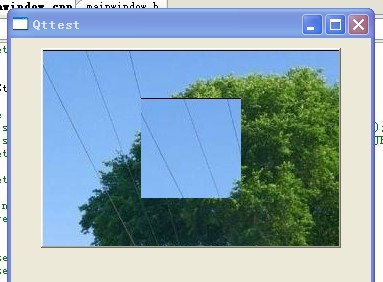
可见:设置有父窗口的子窗口时:setStyleSheet()一定生效!!!
再次修改代码:
MainWin::MainWin()
{
this->setStyleSheet("background-image:url(:/bmp/IMG_0345.JPG)");
iButton = new QPushButton(this);
iLabel = new QLabel(iButton);
QPalette palette;
palette.setBrush(iLabel->backgroundRole(),QBrush(QImage(":/bmp/1257253475842.jpg")));
iLabel->setPalette(palette);
iLabel->setAutoFillBackground(true);
}
此段代码中我用QPalette来设置子窗口的背景图片,看下到底是样式表还是调色板生效,效果如下
http://hi.csdn.net/attachment/201008/17/0_1282036039qk79.gifsetStyleSheet())" />
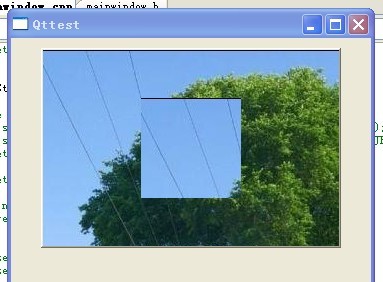
由此可见:一旦顶层窗口设置了样式表,则其子窗口无论用什么方法来设置背景,都会不生效!!!
那如果不是顶层窗口而仅仅是一般窗口设置了样式表呢?再次修改代码:
MainWin::MainWin()
{
iButton = new QPushButton(this);
iButton ->setStyleSheet("background-image:url(:/bmp/IMG_0345.JPG)");
iLabel = new QLabel(iButton);
QPalette palette;
palette.setBrush(iLabel->backgroundRole(),QBrush(QImage(":/bmp/1257253475842.jpg")));
iLabel->setPalette(palette);
iLabel->setAutoFillBackground(true);
}
运行效果同上,这说明:不管是顶层窗口还是一般窗口,只要用setStyleSheet设置了样式表,则其子窗口用其它方式设置背景颜色/图片均不生效,只能用同样方式setStyleSheet来设置更改!!!
为了验证上边的结论,再次修改代码:
MainWin::MainWin()
iButton = new QPushButton(this);
iLabel = new QLabel(iButton);
QPalette palette;
palette.setBrush(iLabel->backgroundRole(),QBrush(QImage(":/bmp/1257253475842.jpg")));
iLabel->setPalette(palette);
iLabel->setAutoFillBackground(true);
}
运行一下:
http://hi.csdn.net/attachment/201008/17/0_1282036111hgSS.gifsetStyleSheet())" />
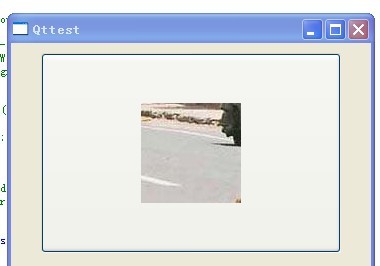
此时调色板才生效,这也间接证明了上述结论。
==========================================================================
总结:
样式表语法:
样式表语法基本和HTML CSS语法一致。
样式表包含了样式规则序列,样式规则有一个和组成,指定哪些窗口将会被这些规则影响,指定哪些属性将会被设定在窗口上,例如
QPushButton{color:red}
在上面的,规则中,QPushButton是,{color:red}是,这个规则指定QPushButton和他的子类将使用红色作为前景颜色,就是字体颜色,并且对大小写没有分别,对于
color,ColoR,COLOR是一样的。
几个可以同时被列出,使用逗号","来分开各个,例如:
QPushButton, QLineEdit, QComboBox { color: red }
部分是一对 属性:值
QPushButton { color: red; background-color: white }
可以参看Qt Style Sheets Reference来查看部件以及样式表的属性列表
喜欢
0
赠金笔